The #1 Adobe Acrobat® Alternative.
Same Tools. Save up to 84%

Edit, convert, merge, and secure PDFs like a pro.
100% compatible with Adobe® files.

24/7 customer support Windows 30-day money back Trusted by 2M+ users
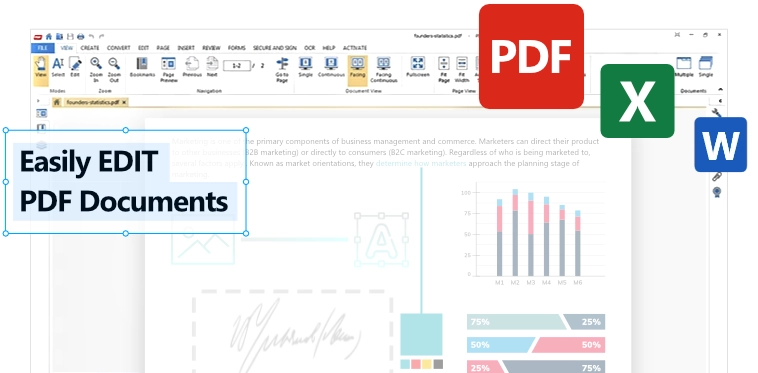
PDF Suite Screenshot
๐Ÿ”ฅ LIMITED TIME OFFER
PDF Suite Logo

PDF Suite Pro

  • $37.95/year (58% off first year)
  • Edit text, images, pages โ€“ unlimited
  • Convert PDF โ‡„ Word, Excel, PPT
  • OCR & Forms support
  • Yearly billing - cancel anytime
โญ 58% OFF โ€“ today only
VS
alt

Adobe Acrobat® Pro

  • $19.99/month or $239.88/year
  • Monthly billing - 12 separate charges
  • 84% more expensive
  • Same core features, higher price
  • No first-year discount
Adobe® and Acrobat® are trademarks of Adobe® Inc.
๐Ÿ“Š Feature Battle

PDF Suite vs Adobe Acrobat® Pro

No hidden costs, full compatibility, all the advanced features of Adobe Acrobat® Pro + more!

Feature
PDF Suite โ˜… WINNER
Adobe Acrobat® Pro
Pricing Model
WINNER
$37.95 per year (billed annually)
58% OFF
$19.99/month
or $239.88/year
subscription lock-in
Edit text & images
Full editing suite
Available
Convert to Word, Excel, PPT
Seamless both ways
Limited export
OCR (Scanned PDFs)
Advanced OCR engine
Yes (Pro)
Batch processing
Convert multiple files
Requires extra plan
Password protection
256-bit encryption
Available
Total cost
$37.95 58% OFF Get PDF Suite Pro
$239.88+ per year 84% more expensive

Everything you need to work faster with PDFs

Open documents, make edits, convert files, insert content, review pages, fill forms, secure sensitive files and sign documents.

View

Open and read PDF files quickly.

Create

Create PDFs from PC applications.

Convert

Convert to and from popular formats.

Edit

Edit text, images and pages.

Secure

Protect PDFs with a password.

Sign

E-sign and email documents.

โšก Limited time offer: 58% off

Get PDF Suite Pro today.

Limited time savings, instant access and a free PDF Templates Pack included.

$37.95
$89.95
  • All Standard features
  • Create and edit PDFs
  • E-sign and email PDFs
  • Secure PDFs with a password
Get PDF Suite Pro
๐ŸŽ๐ŸŽ

Free gift included โœจ

Templates Pack

Included with the offer to help you start faster.

  • Useful PDF templates
  • Works with PDF Suite workflows
  • Instant download after checkout
  • Secured payment processing
Claim Offer
PDF Suite Boxshot

Edit any PDF in 3 easy steps

  1. Start PDF Suite โ€“ Open your PDF file.
  2. Edit content โ€“ Click on text/images to modify.
  3. Save & Export โ€“ Export as PDF, Word, and many other formats.
Powerful editing

How to edit a PDF file without Adobe®?

With PDF Suite's intuitive PDF Editor, you can modify text, adjust images, add watermarks, or rearrange pages just like in MS Office. No steep learning curve.

Get PDF Suite Pro

Why choose PDF Suite as your PDF editor?

The smart Adobe Acrobat® Pro alternative for editing, converting, and securing PDF documents.

PDF Suite

Edit PDF files easily

PDF Suite's PDF editor lets you modify text, images, and pages just like a Word document. No learning curve.

Convert PDF to Word & more

Convert PDF to Word, Excel, PowerPoint, and back. Batch convert multiple files in one click.

Secure PDF documents

Protect sensitive PDF files with passwords, redact private information, and add digital signatures.

โญ Trusted by 2M+ users

What users say about PDF Suite

The Adobe Acrobat® Pro alternative that professionals love

S
Sarah Johnson Marketing Director

"Best Adobe Acrobat® alternative I've found. Editing PDF files used to be a nightmare, but PDF Suite makes it as easy as Word. The PDF to Word conversion is flawless."

Verified buyer
M
Michael Chen IT Manager

"We switched our entire team from Adobe® to PDF Suite. The PDF editor handles everything we need โ€” converting PDF to Word, securing documents, and batch processing. Saved us thousands."

Verified buyer
E
Elena Rodriguez Freelance Designer

"Finally an Adobe Acrobat® alternative that doesn't break the bank. I edit PDF files daily for client work. The OCR feature is amazing for scanned documents."

Verified buyer
D
David Kim Small Business Owner

"The PDF to Excel conversion alone is worth it. I process dozens of invoices monthly. PDF Suite saves me hours compared to Adobe®. Highly recommend this PDF editor."

Verified buyer
J
Jessica Patel Legal Assistant

"Securing PDF documents is critical in my field. PDF Suite's password protection and redaction tools are top-notch. A true Adobe Acrobat® alternative for legal professionals."

Verified buyer
T
Tom Williams Real Estate Agent

"I edit PDF files daily for contracts and disclosures. PDF Suite is faster and more intuitive than Adobe®. Plus the yearly billing is way better than monthly fees. Highly recommend."

Verified buyer

Secure payment

30-day refund

24/7 support

Frequently Asked Questions

Absolutely. PDF Suite is a complete Adobe® alternative. You can edit text, images, and secure documents without any subscription fee.

Yes, 100% compatibility. Open, edit, and save standard PDFs created with Adobe Acrobat®.

The free Templates Pack includes 50+ professional PDF templates (invoices, forms, contracts) that work seamlessly with PDF Suite.

PDF Suite is offered as a yearly subscription. You pay $37.95 for the first year (58% off), then renews annually. Cancel anytime - no long-term contracts.

Yes, PDF Suite is the #1 Adobe Acrobat® Pro alternative for editing PDF files, converting PDF to Word, Excel, and PPT, and securing sensitive documents. Thousands of users switch from Adobe® to PDF Suite every month.

Absolutely. PDF Suite lets you convert PDF to Word, Excel, PowerPoint, and back. The conversion preserves formatting, images, tables, and fonts โ€” something many free PDF converters struggle with.

Both PDF Suite and Adobe Acrobat® Pro offer password protection and 256-bit encryption. However, PDF Suite provides these security features at a fraction of Adobe®'s cost, with yearly billing instead of expensive monthly payments.

No. PDF Suite is a complete Adobe Acrobat® Pro alternative that lets you edit PDF files, add images, modify text, and rearrange pages โ€” all without an Adobe® subscription. Many users call it the best PDF editor for Windows.

The trademarks ADOBE®, ADOBE ACROBAT® and ACROBAT® are the exclusive property of ADOBE Inc.
The mention of trademarks on this page does not imply any affiliation between the publisher and ADOBE Inc.

Get PDF Suite Pro